
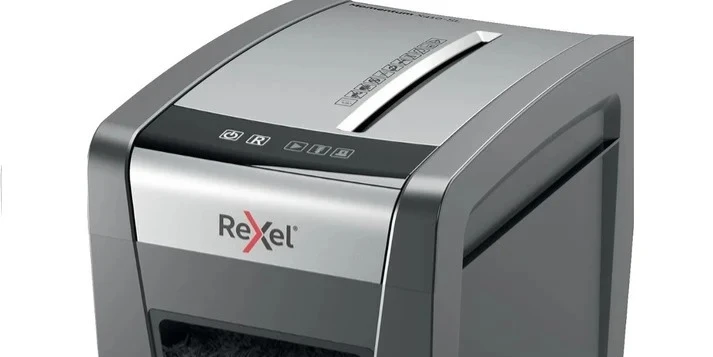
* All product/brand names, logos, and trademarks are property of their respective owners.
Choosing the right shredder is important when you regularly handle personal, financial, business, or confidential documents. A good paper shredder does more than simply cut paper into smaller pieces. The right model can help protect sensitive information while making document disposal faster and more convenient.
However, not every shredder is designed for the same purpose.
A compact home-office model may be suitable for occasional document disposal, while a busy office may require a higher-capacity machine with faster shredding and automatic feeding.
Security level, sheet capacity, cutting method, bin size, operating time, noise, maintenance, and the amount of paper you need to destroy should all be considered before making a purchase.
This guide explains what to look for when choosing a paper shredder and how to select a model based on your actual requirements.
A paper shredder is a machine that cuts paper documents into smaller pieces so that the information printed on those documents is more difficult to reconstruct.
Businesses and households can use shredders to dispose of documents containing information such as:
Personal details
Financial records
Invoices
Bank statements
Business documents
Customer information
Internal correspondence
Printed passwords
Old receipts
Confidential paperwork
The level of security depends largely on the cutting method and the size of the resulting pieces.
Throwing sensitive documents directly into a normal waste bin can expose information that should no longer be accessible.
A paper shredder provides a more controlled way to destroy unwanted paperwork.
For households, a shredder can be useful for disposing of:
Old bills
Bank statements
Receipts
Personal correspondence
Copies of identification documents
Outdated financial records
For businesses, shredders can help with the disposal of:
Employee records
Customer documents
Internal reports
Financial paperwork
Contracts
Confidential notes
The right machine depends on the type and volume of documents you handle.
Before comparing different models, identify the primary environment.
Will the machine be used at:
Home
Home office
Small business
Corporate office
Reception area
Administrative department
Financial department
Professional document-processing environment
A home user who shreds a few documents each week has very different requirements from an office that processes large amounts of paperwork every day.
For occasional use, a compact machine may be sufficient.
Important features can include:
Compact size
Simple controls
Moderate sheet capacity
Appropriate security level
Easy emptying
Reasonable noise level
An office may require a more capable machine.
Important factors can include:
Larger paper capacity
Higher sheet throughput
Larger waste bin
Longer operating cycles
Higher security
Automatic feeding
Jam prevention
The key is to match the machine with the workload.
Security is one of the most important factors when selecting a paper shredder.
Different cutting methods produce different particle sizes.
The three common categories are:
The document is cut into long strips.
This is generally suitable for less sensitive paperwork where high-security destruction is not required.
The paper is cut in multiple directions, creating smaller particles than strip-cut shredders.
Cross-cut models can provide a higher level of document security for many household and office applications.
Micro-cut machines produce very small particles.
They are often chosen when documents contain highly sensitive or confidential information.
The appropriate level depends on the type of documents being destroyed and the required security standard.
Sheet capacity tells you approximately how many sheets a machine can process in one pass under the manufacturer's stated conditions.
For example, Toyzinn's current collection includes models with different capacities, including compact machines designed for smaller workloads and automatic-feed models capable of handling much larger batches.
A higher sheet capacity can save time when processing larger stacks of documents.
However, you should not select a machine based on sheet capacity alone.
Also consider:
Paper thickness
Paper size
Staples
Paper clips
Operating time
Feeding method
Always follow the manufacturer's instructions.
One important feature to compare is how paper is fed into the machine.
With a manual-feed model, you place documents into the paper entry yourself.
These models can be practical for:
Home users
Small offices
Occasional document disposal
Controlled document processing
They can also be simpler to operate.
Automatic-feed models allow you to load a larger stack of documents and let the machine process them automatically.
This can be particularly useful when dealing with larger quantities of paperwork.
Toyzinn's current collection includes Rexel Optimum AutoFeed+ models with automatic feeding capacities ranging from 150 to 750 sheets under specified conditions.
Automatic feeding can save time when document volume is high.
Shredding speed can affect productivity.
If you only process a few documents at a time, speed may not be a major concern.
For an office processing large quantities of paperwork, however, a faster shredder machine can make document disposal more efficient.
Look at the manufacturer's stated:
Sheets per minute
Continuous run time
Cooling requirements
Automatic-feed speed
Do not assume that a higher sheet capacity automatically means higher overall productivity.
After documents are shredded, the particles collect in a waste bin.
A small bin may need frequent emptying.
A larger bin can reduce the frequency of emptying, which may be more convenient in a busy office.
Consider:
Bin size
Bin removal method
Full-bin indicator
Transparent viewing window
Ease of emptying
For home use, a smaller bin may be perfectly practical.
For heavy office use, a larger capacity can save time.
Shredders are not necessarily designed to operate continuously.
Many models have a specified duty cycle or maximum operating period.
If the machine becomes too warm, it may need to cool down before continuing.
This is particularly important for businesses that need to process large quantities of documents.
Before purchasing, consider:
How much paper do you normally shred in one session?
If the answer is only a few pages, a basic model may be enough.
If you regularly process hundreds of pages, look for a machine designed for higher workloads.
Paper jams can interrupt work and become frustrating during large shredding jobs.
Some machines include features designed to reduce the risk of jams or help users clear them more easily.
When comparing models, look for features such as:
Reverse function
Overload protection
Automatic jam detection
Jam-free technology
Clear paper-entry design
For example, Toyzinn's collection includes the Rexel Momentum Extra XP418+ marketed with jam-free operation.
Always avoid forcing excessive paper into the machine.
Noise can be important when a shredder is used in a home office, reception area, or shared workspace.
A loud machine may become disruptive when used frequently.
If noise is a concern, check whether the manufacturer provides a noise rating.
Also consider where the machine will be positioned.
A shredder placed next to a workstation may have a different practical impact than one located in a dedicated document-processing area.
Not every shredder accepts the same materials.
Depending on the model, a machine may be designed to handle certain items such as:
Paper
Staples
Paper clips
Credit cards
CDs or DVDs
Never assume that a particular machine can process non-paper materials.
Check the manufacturer's specifications before inserting anything other than standard paper.
Some shredders are designed to process documents containing staples or small paper clips.
However, this varies by model.
If your office documents frequently contain staples, check the manufacturer's specifications before purchasing.
Removing staples manually from hundreds of documents can take considerable time.
Most office-oriented machines are designed around common paper sizes such as A4.
However, the exact paper-entry dimensions vary.
Before buying, check whether the machine supports the document sizes you commonly use.
If you regularly process:
A4
A3
Smaller receipts
Envelopes
Folded documents
Verify the manufacturer's specifications for each material.
Not every document requires the same level of destruction.
Examples can include:
General notes
Non-confidential drafts
Publicly available information
A basic cutting method may be sufficient depending on the situation.
Examples include:
Bills
Receipts
Addresses
Financial paperwork
A cross-cut model can provide a stronger level of destruction.
Examples may include:
Sensitive business information
Confidential customer data
Certain financial records
A higher-security micro-cut model may be more appropriate depending on the applicable requirements.
Organizations should also consider their own information-security policies.
A home user usually does not need the same capacity as a large corporate office.
When choosing a home model, consider:
Security level
Compact design
Noise
Sheet capacity
Bin size
Operating cycle
Ease of use
A practical home machine should be easy to operate and simple to empty.
If you only shred documents occasionally, paying for extremely high-capacity features may not be necessary.

Hi, I’m Freya Parker, an automotive expert based in Melbourne. I specialise in helping people navigate the car selling process with confidence and ease. From valuing your vehicle to understanding market trends, I provide practical tips and honest advice to help you get the best possible price. My goal is to make selling your car simple, stress-free, and rewarding no confusion, just clear guidance and results.
Steel stairs are an important part of many residential, commercial, and industrial buildings. They p
20 July 2026
Transforming a house into a sanctuary often requires pieces that fit perfectly into every corner and
10 July 2026
When selecting an air conditioner, make sure you choose one that will keep you comfortable at home w
1 July 2026
Be the first to share your thoughts
No comments yet. Be the first to comment!
Share your thoughts and join the discussion below.




.webp&w=3840&q=75)